

Example Blog Article
Example Blog Article
rearc
ai
llm
A deep dive into Databricks Foreign Catalogs for Glue Iceberg table access

Databricks Foreign Catalogs solves a common scenario: how to give your teams access to Iceberg tables in AWS Glue without duplicating any data or creating a complex migration process.
Much like the mythical first event of mixing chocolate and peanut butter, you have a great option for connecting your Databricks workflows to Glue Iceberg tables available in Databricks Foreign Catalogs.
A Foreign Catalog is a top level Unity Catalog object that sits in the hierarchy at the same level as other managed catalogs in your metastore. Once set up, it will behave just like a typical catalog, except the databases and tables will reference databases and tables that are managed by your AWS Glue catalog.
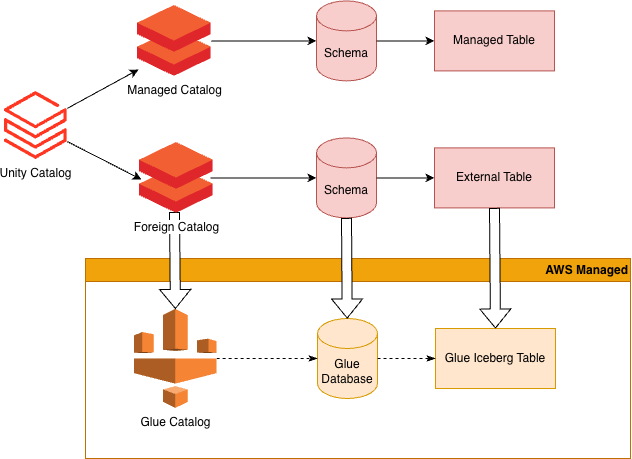
From a Databricks notebook or dashboard, you can query your Glue-managed Iceberg tables as if they were hosted in your Databricks account. You can manage permissions for the tables in the catalog just like tables for any other catalog. This gives you fine-grained control over your permissions manageable through Unity Catalog.
There is no duplication of data.
Data is loaded directly from the source object store into your compute environment for use by your queries. Databricks tracks table changes and statistics in the delta-log format used by Delta UniForm. This will be kept in the managed storage location associated with the catalog. There is a small storage cost for this metadata.
Note that this metadata will not be created or refreshed until the table is queried, so this will reduce costs associated with tracking tables that are not being used in your queries.
Set up takes hours instead of weeks, and your data science team gets Databricks notebook access while querying your data directly from the Glue S3 object store.
Foreign Catalog Setup: 2-4 hours (estimate first time), 30 minutes (subsequent catalogs)
Full Migration to Databricks Managed Tables: 4-12+ weeks
Data scientists, analysts, and engineers interact with foreign tables exactly as they would with native Databricks tables. You can run queries on this catalog just like you would for any other catalog.
SELECT * FROM `foreign-glue-catalog`.`iceberg-glue-database`.`my-table`;
Users don't need to learn new query patterns, use special functions, or remember which tables are external. The foreign catalog appears in the catalog browser alongside managed catalogs, with clear visual indicators showing the source type.
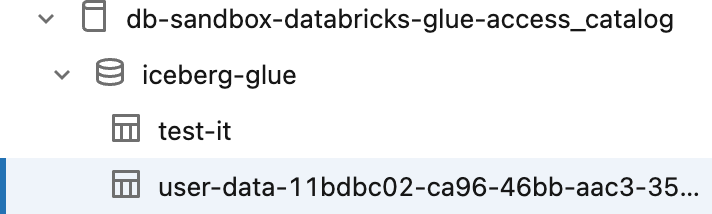
A foreign catalog will appear in the Catalog section of the Databricks UI similar to any other catalog available in your workspace.
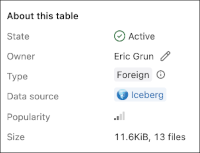
Databricks provides handy indicators to show whether the table source is Iceberg or Delta, and if it is part of a Foreign catalog, in the Overview tab for a table, under About this table.
Foreign tables work seamlessly in Databricks notebooks across all supported languages. One of the more powerful features is the ability to join across foreign and native tables in a single query.
SELECT *
FROM `foreign-glue-catalog`.`iceberg-glue-database`.`customer-orders` orders
JOIN `databricks-catalog`.`native-schema`.`customers` cust
ON orders.customer_id = cust.customer_id;
Standard Databricks metadata commands work on foreign tables
DESCRIBE TABLEDESCRIBE TABLE EXTENDEDDESCRIBE HISTORYSHOW TABLES IN `foreign-glue-catalog`.`iceberg-glue`;SHOW TBLPROPERTIESUse Unity Catalog to Show, Grant, or Revoke privileges on tables in your Iceberg catalog. Foreign catalogs integrate seamlessly with Unity Catalog's permission model, allowing you to manage access to external Glue tables using the same commands and workflows you use for native Databricks tables. You can grant permissions at the Catalog, Schema, or Table level. To restrict visibility at the column or row level, you may create a View on top of your external table.
Permission Errors are Clear and Actionable:
Error: [INSUFFICIENT_PERMISSIONS]
User 'analyst@company.com' does not have SELECT permission on
table 'foreign-glue-catalog.iceberg-glue.sensitive_data.

Contact your administrator or request access through Unity Catalog.
Databricks’s Foreign Catalogs for Iceberg supports the following features of Iceberg tables:
Foreign Catalogs provide read consistency through Iceberg’s snapshot isolation. Queries will read from a consistent snapshot of the table.
Time travel queries are fully supported.
Query a table as it existed yesterday:
SELECT * FROM `foreign-glue-catalog`.`iceberg-glue`.`transactions`
VERSION AS OF '2026-02-03';
Query a specific snapshot:
SELECT * FROM `foreign-glue-catalog`.`iceberg-glue`.`transactions`
VERSION AS OF 1234567890;
You will not be able to restore or rollback tables to previous versions through Databricks because you are limited to read-only access through the foreign table. To revert to a previous version make these changes at the source in Glue.
Iceberg supports Schema Evolution including adding, removing, moving, and renaming columns. It also supports widening column types and changing fields from required to optional. These changes are all supported and will be immediately reflected on the foreign tables when they are next refreshed. Schema evolution is automatic and no schema refresh or migration is needed.
Foreign Catalogs are fully compatible with Delta UniForm and Delta Sharing. For external access to your tables, enable external access on your metastore and grant EXTERNAL USE SCHEMA to your principals.
Using the UniForm Iceberg api, you get full advantage of Unity Catalog permissions for managing data access.
Querying the tables endpoint will give you a list of only the tables that you have SELECT permission to query.
A user that has full select access to the Schema will see all of the tables in the Schema.
This provides read-only access to your Glue Iceberg tables from any Iceberg client using Databricks as your Iceberg Catalog API. Databricks Unity Catalog foreign catalogs gives you a single unified service where you can manage access permissions to all of your data.
Also, You can share your external tables using Delta Sharing, see this post from Databricks.
Good fit:
Poor fit:
Foreign Catalogs is a great first step in a migration strategy.
Foreign Catalogs make a lot of sense in many situations for ease of setup and configuration. However, careful consideration should be given for the option of migrating your data directly into tables managed by Databricks.
Databricks provides automatic table optimization.
Iceberg tables can suffer major performance degradation without proper maintenance, removing stale snapshots and merging and optimizing small metadata files.
These tasks need to be scheduled, monitored, and maintained. To mitigate the cost of table maintenance, Databricks offers two services to automatically optimize your Iceberg tables.
Predictive Optimization automatically determines the optimal time to run maintenance tasks on your tables.
This eliminates the cost associated with running maintenance tasks too often as well as the performance impacts of not running them when your tables will benefit the most.
Liquid Clustering automatically tunes the layout of data within your files to best suit the queries that you are actually running on your tables.
These two features make a compelling argument for switching your Iceberg catalog to Databricks Managed Iceberg tables.
Glue Iceberg Tables
Databricks Foreign Catalog
* Note: depending on your configuration, there may be additional costs for networking and infrastructure
Databricks Foreign Catalogs maintains a copy of the Iceberg metadata as Delta UniForm to improve query performance. The bulk of the costs for using Databricks Foreign Catalogs is due to the metadata replication. On a properly optimized and maintained Iceberg table, this should be a very small factor of the overall storage costs.
One of the more significant benefits of using Databricks Foreign Catalogs is the ability to access your tables using Databricks compute clusters. At Rearc, we have seen substantial cost reductions associated with switching your workloads from Redshift to Databricks. Depending on your workloads this may be a major factor in choosing to incorporate Databricks Foreign Catalogs as part of your Data Lake.
Also consider using Databricks Serverless for small ad-hoc jobs as this may be a significant cost reduction over the cost of Redshift Serverless or the per terabyte cost incurred when using AWS Athena.
When running queries on foreign tables, the query will run on your databricks compute instances, but it is directly accessing the table data from the source system cloud object store. Be mindful of data egress costs for crossing regions and the associated impact to performance for long distance data transfers. Use an AWS Databricks metastore and compute clusters that are hosted in the same region as your Iceberg tables to reduce these costs. Databricks does not charge for reading the data from S3, however AWS will charge for transferring data across regions. You can use a different AWS account for Databricks than the one that is hosting the Glue database. There is no extra fee associated with using multiple accounts. If you are using Databricks that is hosted on Azure or GCP, you will incur data transfer costs for the data moving from S3 to the Internet.
There will be costs associated with the API access calls to S3. To reduce costs for accessing small files make sure to regularly optimize your tables and use optimal file sizes for your data access needs.
This document has provided some helpful information on this new service offering from Databricks. For situations where you want to query a Glue Iceberg table from Databricks, Databricks Foreign Catalogs provides a great solution for this. You can run queries or dashboards on Foreign Tables. You can share your tables from a SQL warehouse or through the Delta UniForm API or Delta Sharing. Foreign Catalogs are a great and easy tool to use for any Databricks engineer or scientist.
Read more about the latest and greatest work Rearc has been up to.
Example Blog Article

A deep dive into Databricks Foreign Catalogs for Glue Iceberg table access

Learn how we built Rearc-Cast, an automated system that creates podcasts, generates social summaries, and recommends relevant content.

Overview of the Talent Pipeline Analysis Rippling app
Tell us more about your custom needs.
We’ll get back to you, really fast
Kick-off meeting